Best VTT Software 2026: Roll20 vs Foundry VTT vs Fantasy Grounds vs Owlbear Rodeo
A DM-focused VTT comparison for groups choosing between browser convenience, automation depth, one-time software ownership, official content, and fast battle-map play.
Affiliate disclosure: As an Amazon Associate, CinderSpire Studio may earn from qualifying purchases through the product links below. Rankings are based on published specifications, official documentation, and cited third-party measurements, not paid placement or fake user reviews.
Quick Verdict
| VTT | Best For | Pricing Snapshot | Main Tradeoff |
|---|---|---|---|
| Roll20 | Beginner groups and browser-only play | Free, Plus $5.99/mo, Pro $10.99/mo, Elite $14.99/mo per Roll20 feature breakdown | Subscriptions and storage limits affect larger campaigns |
| Foundry VTT | Power DMs and module-heavy campaigns | Perpetual license listed at €43 plus tax on the official purchase page | Requires hosting decisions and setup time |
| Fantasy Grounds | Rules automation and licensed content libraries | Fantasy Grounds customer portal says VTT is now free with no license required | Interface and content model take learning |
| Owlbear Rodeo | Fast maps, fog, lightweight sessions | Free/paid tiers via Owlbear pricing page | Less native rules automation |
Amazon Gear Picks
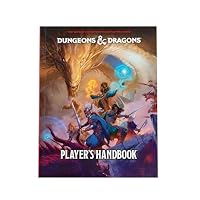
D&D Player's Handbook 2024
Core player rules, character options, spell reference
Check Price on Amazon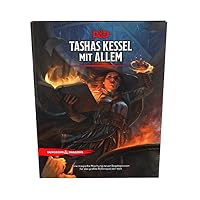
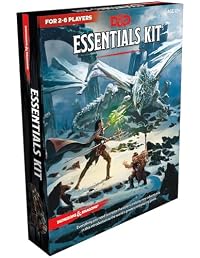
Choose By Group Workflow, Not Feature Count
Virtual tabletops fail when the DM buys the most powerful platform but the group needs the fastest one. A rules-heavy Pathfinder or D&D campaign with automation needs a different tool than a casual one-shot that only needs a map, fog, tokens, and dice. The right VTT is the one your least technical player can join and your DM can prep without dreading the next session.
Roll20 remains the easiest default for many groups because it is browser-based, familiar, and has a free tier. Its official feature breakdown lists free hosting, access to many game systems, content sharing limits, and storage limits, then scales Plus, Pro, and Elite features with Dynamic Lighting, API/mod access, storage, and sharing increases. That makes it predictable for a group that wants to start tonight.
Foundry VTT is the opposite philosophy: buy the software license, own the server-side tool, and customize deeply. The official purchase page describes a perpetual license with future updates. Foundry is excellent for DMs who enjoy modules, automation, compendiums, walls, lighting, and local control. It asks for more setup discipline than Roll20.
Fantasy Grounds has historically been the automation-heavy option with deep licensed content. Current Fantasy Grounds customer portal documentation says the VTT is now free with no license required, which changes the cost conversation substantially. You still need to think about content purchases and learning curve, but the software access barrier is lower than older comparisons suggest.
Feature Matrix
| Need | Roll20 | Foundry VTT | Fantasy Grounds | Owlbear Rodeo |
|---|---|---|---|---|
| Join From Browser | Yes | Players join hosted worlds in browser | App-focused with online services | Yes |
| Rules Automation | Moderate, sheet/system dependent | High with modules and systems | Very high for supported systems | Light by design |
| Map And Fog | Dynamic Lighting on paid tiers | Strong walls, lighting, modules | LOS and map automation | Fast fog and drawing tools |
| Content Marketplace | Large official marketplace | Growing official and community modules | Deep official library history | Asset and extension ecosystem |
| Best Session Type | Standard online campaign | Custom campaign with automation | Rules-heavy campaign management | Fast tactical maps and one-shots |
Owlbear Rodeo deserves respect because it does less on purpose. Its documentation describes rooms, scenes, maps, tokens, drawing, measurement, and fog tools. For many DMs, that is enough. If you already manage characters in D&D Beyond, use Discord for voice, and roll physical dice, a lightweight map tool can be better than a full automation suite.
The more automation you add, the more you must maintain. Foundry modules can break after major updates. Roll20 macros can become hard to debug. Fantasy Grounds effects can require system knowledge. Owlbear maps can become asset-management work if you upload huge files. Every VTT has maintenance; the question is which maintenance your DM is willing to do.
Pricing And Ownership
Roll20 is subscription-tiered. The official feature breakdown lists a free tier, Plus at $5.99 per month or $59.99 per year, Pro at $10.99 per month or $109.99 per year, and Elite at $14.99 per month or $149.99 per year. The key detail is that the game creator's subscription unlocks many table features for the campaign.
Foundry is a software license model. The official purchase page lists a software license key at €43.00 before tax and states that the purchase provides a perpetual license and access to future updates. The missing cost is hosting: you can self-host, use a cloud host, or pay a service. For a stable long campaign, include hosting in the real budget.
Fantasy Grounds has changed enough that old pricing comparisons are often wrong. Its current customer portal documentation states that Fantasy Grounds VTT is now free and no license is required for GMs and players to host and join unlimited games. That does not make all content free; official rulebooks, adventures, and modules remain part of the content economy.
Recommendation By Table Type
For CinderSpire tools, the pairing is straightforward. Use the Initiative Tracker when your VTT initiative flow is too heavy, use the Dice Roller for browser-visible rolls, and use the Encounter Calculator before prepping combat in any VTT.
- New D&D group: start with Roll20 or Owlbear Rodeo, then upgrade only if the campaign proves durable.
- Tech-comfortable DM: choose Foundry VTT if you want automation, modules, local control, and long-term customization.
- Rules automation priority: test Fantasy Grounds with the exact system and official content your group uses.
- In-person TV map: Owlbear Rodeo is often the quickest because fog, scenes, and tokens are simple.
How To Use This Guide Without Overbuying
Use the tables as a decision filter, not as a command to buy the most expensive item. A good gaming purchase starts with the bottleneck you can prove: input latency, frame rate, stream stability, voice clarity, table workflow, display motion, or laptop thermals. Once the bottleneck is clear, compare the specification that actually affects it. For keyboards that might be actuation behavior and layout. For a PC it is usually the GPU and monitor target. For software it is reliability, encoder support, and how quickly a creator can recover when something breaks five minutes before going live.
Prices and Amazon listings move faster than published specifications. Treat the affiliate cards as live availability shortcuts and the citations as the stable evidence layer. If a listing changes configuration, color, RAM amount, switch type, display panel, or included accessory, follow the specification table instead of the product title. This is especially important for gaming laptops, prebuilt bundles, monitors, and peripherals with regional variants. Two products can share the same retail name while using different screens, sensors, switches, power limits, or firmware options.
The practical buying process is: define the use case, check the cited manufacturer or platform documentation, compare at least two alternatives, read measured testing where available, then buy only if the return policy gives you enough time to test the product in your own setup. For physical gear, test comfort, noise, heat, cable routing, and software behavior immediately. For software and online tools, run a private rehearsal with the exact scenes, bots, maps, or rules you expect to use. The best choice is the one that keeps working after the initial setup excitement fades.
Sources And Methodology
We prioritized official manufacturer specifications, official software documentation, and specialist test labs where available. Pricing, availability, and Amazon listings can change quickly, so use the product links as a live availability check and the specification tables as the stable decision layer.
- Roll20 Feature Breakdown
- Roll20 Subscription Help
- Foundry VTT Purchase Page
- Fantasy Grounds License Keys FAQ
- Owlbear Rodeo Documentation
- Owlbear Rodeo Fog Documentation
Frequently Asked Questions
What is the best VTT for D&D beginners?
Roll20 is the safest beginner default because it runs in the browser, has a large user base, and can start free. Owlbear Rodeo is even lighter if you only need maps, fog, tokens, and voice through Discord.
Is Foundry VTT worth it in 2026?
Yes for DMs who want customization, automation, modules, local control, and long campaigns. It is less ideal for a DM who wants no setup and no hosting decisions. The license model is strong, but the DM must enjoy managing the tool.
Is Fantasy Grounds free now?
Current Fantasy Grounds customer portal documentation states that Fantasy Grounds VTT is now free and no license is required. Content purchases still matter, so verify what official rulebooks, adventures, and add-ons your campaign needs.
Do players need to buy the VTT?
It depends on the platform. Roll20 players can join games free, with many features based on the creator's subscription. Foundry players generally connect to the host's world in a browser. Fantasy Grounds access has changed with its free VTT model. Owlbear Rodeo is designed for quick browser joining.
Which VTT has the best automation?
Fantasy Grounds and Foundry are the strongest automation picks, but they differ. Fantasy Grounds emphasizes ruleset and content automation. Foundry emphasizes modular customization and community systems. Roll20 automation varies by sheet and subscription tier.
Which VTT is best for in-person play?
Owlbear Rodeo is excellent for in-person TV maps because it is fast and simple. Foundry is better if you want walls, lighting, and token automation on a dedicated display. Roll20 can work but may be heavier than needed.
Can I migrate between VTTs easily?
Not perfectly. Maps, tokens, journals, character sheets, compendiums, walls, lighting, and purchased content are platform-specific. Before committing to a long campaign, test one encounter and one level-up workflow in the VTT you plan to use.
Should my VTT replace Discord?
Usually no. Discord remains excellent for voice, community channels, scheduling, and between-session notes. Let the VTT handle maps and mechanics, and let Discord handle the community layer unless your VTT voice/video workflow is clearly better for your group.
Related CinderSpire Tools And Guides
These internal tools help turn the buying advice into real play, streaming, or tabletop prep workflows.